Sunday, 8 June 2014

AnotherTheme

I've been asked if I would do a review for AnotherTheme by @Arnaud_delaTour, and as you may already know I jumped at the chance to review this theme, as I do with all my reviews. Well let's start from the beginning, after you've selected your preferred elements from within Winterboard you'll be met by a great Aztec style boot logo, which is really a great boot logo so from the start your intrigued to see how the theme looks once you've unlocked your iPhone, and you won't be disappointed as when the springboard is visible you'll be met with a bright exuberant set of icons with a hint of retro thrown into the mix, the iconomatic overlay is very light which really compliments the style of the icons. The colours used in the icons are quite unusual and their is some colours which I've not seen in other icons before, the blending and mixture of the colours is brilliantly balanced and that's important as sometimes people throw colours in and they don't blend with other colours selected and that can really spoil the overall look of the theme. The UI has been themed where it can be, I really like the dustbins on the icons to delete them when you've put the icons in jiggly mode, it's a nice touch and you'll find plenty of these small gentle and subtle changes in the UI the more you use the theme the control centre has been themed and the toggles look great yet are not overdone just changed enough to give the control centre it's own unique look, also another great feature is the folders appear to have shelves in them once you've opened them, and also other tweaks to the UI like Cydia and in AppStore. Included in the theme are wallpapers, a classicdock, an iconomatic overlay, splash screen , it's own statusbar and a Vertex theme and lest I not forget that cracking boot logo I mentioned earlier in the review and settings icons are also themed (big thanks to @Jato_BZ) and plenty of other goodies are also included in this theme. This theme is live on the @modmyi repo now, check out the screenshots below for a look at how your iPhone could look with this wonderfully coloured and thought out theme. And please remember to purchase the theme in the correct way. 


Friday, 6 June 2014

Sep7


Today I bring you a review of the beautiful theme Sep7 by @djetouch. Well to start with I'm impressed in a big way, Sep7 is a soft colourful and strikingly attractive theme, looking at it feels like someone is gently massaging your eyes, it's a joy to look at and also has a very calm and relaxing look and effect, the icons have been lovingly created to bring as much visual pleasure as is possible from a theme, and the gentle touches of UI throughout the theme is extraordinarily superb, and also other great features like a liquid classicdock, which is a great addition to the look you get on your springboard. This theme is a great follow up to FUEL, where FUEL was really dark Sep7 is so colourful and vibrant, when you respring from Winterboard after enabling your selected elements you'll be met by a great Sep7 logo. You get a large selection of elements to choose from inside Winterboard, including everything from Iconomatic themes, badge colours ,choice of boot logos and classicdocks, as well as statusbar options and lockscreen mods. It really is a great theme to have on your iPhone, no matter what your mood is this theme will give you great user experience and make using your iPhone a pleasure. It's the small details you'll notice make this theme complete, like the keypad buttons are brilliantly tweaked to give a feel of real shape instead of just flat looking buttons also the settings icons are themed as well as icons in Cydia and also the  changes and manage buttons are gently tweaked and also the loading cycle is redesigned. This theme is live in Cydia now on the ModMyI repo and in my opinion it's a must have theme for anyone's iPhone. Great job Dje. Don't forget to check the screenshots below.And remember to purchase your copy in the right way. 


Thursday, 29 May 2014

Savannah

Today I bring to you my review for the theme Savannah by @iHaz3, and what can I say but this is in my opinion Daniels best theme since RetinaHaz3 (which was and is my personal favourite theme of Daniels until now). The detail in the design of each icon is stunning, right from the stock items down to Cydia apps. Daniel has managed to step away slightly from the "dark" themes of past and at the same time keep some of what we know of Daniels previous designs still present in the design of some of the icons for Savvanah, this has been a busy couple of months for @iHaz3 with this theme being his third consecutive theme in about the same amount of months. The blend of dark and colourfully designed icons is superb, it's also nice that some other talented designers like Romy (@Bacardi1985) has had some input into this great theme with his legendary a iconomatic overlay skills, and also @MTK_Des1gn who designed the AppStore and iTunes icons respectively, great to see yet again some great designers coming together to bring us a varied style of designs and successfully moulding them into 1 theme. As usual you get a vast number of elements to choose from inside of Winterboard, from JellyLocks, GroovyLocks, badges, widgets (coded by @Schnedi), Zeppelin logos and more including a night mode version of the theme which really turns it into a old black and white style to the icons, which goes to show Daniel still has the "dark side" flowing in his design styling. The Night mode edition comes with a selection of beautifully dark look to the icons and also a great Iconomatic themes with a light effect just at the bottom of each icon, in a range of colours, it all adds beautifully to the "dark" effect of Night Mode. As usual owners of this theme will have plenty of customisation at their fingertips to enable them to set their phone/iPad to how they want it, which is the reason we all loves themes as no ones HomeScreen will look the same. Icons are being updated regularly and there is a thread on ModMyI forum, just search for Savannah and you'll find the thread, it's great to be able to see how others are putting their input into this great theme. Savannah is live on the @macciti repo now is compatible with iPhones/iPads and iPods. You won't be disappointed with this theme it is already a classic which we all hope will continue through the iOS versions to come. So well done Daniel on another fantastically designed theme. So check out the screenshots below and if you like it then go grab it from Cydia now, and please don't pirate this theme, piracy will kill our community. 


Thursday, 15 May 2014

Collision

I've been asked if I'd be happy to write a review for Collision by Alex Sanchez, and as always I'm happy to write a review and support peoples great work. Collision is, on first impressions very colourful and vibrant, but as you look closer at the icons you'll see shadows, depth and 3 dimensional look and feel to each icon. But after admiring Collision and getting a feel for the look and flow of the theme you can change the look, as this theme has 3 versions inside of Winterboard, 1) Collision, 2) Soft and 3) Dark. The Soft version takes out some of the 3 dimensional appearance and subtly flattens the icons out and giving you a softer look to it. And then obviously Dark does darken the look of the icons but doesn't completely take out all the colour and vibrancy from the theme. There are plenty of elements to choose from including JellyLock, StatusBar (which is a nice addition) and Messages UI, Control Centre and a iconomatic theme. This theme is fun to look at and have on your iPhone, and if your happy and having fun then that's what matters, and this is what this theme is about, Fun, Colour and Vibrancy. Check out the screenshots below, Collision is live in Cydia now, and remember to purchase the right way as piracy affects us all. 


Monday, 5 May 2014

Loop

Today I'm bringing you a review of Loop by Zoostar. This is a very colourful theme, not too bright or dull, Zoostar has got the balance and shades of colour just right, it's a real eye pleaser. When you respring after selecting the elements from winterboard you'll be presented with the Loop logo which is a real cool looking logo, not to big or brash, yet again the balance is just right. Inside Winterboard you'll find 6 ClassicDocks, 4 Iconomatic themes and 2 JellyLocks.You will need JellyLock, Iconomatic and ClassicDocks from Cydia for these elements to work, so you can really play about with your set up. Each Iconomatic theme really does change the appearance of the icons, and it does so gracefully, yet again nothing is pushed out of place as the balance of change is just perfect. This theme has been beautifully crafted with careful selection of colours and doesn't blind you, it just leaves you looking at your homescreen for long periods of time. Now let's get on to the UI, CCSettings are themed with pleasant little designs inside the toggles, also Auxo2 is themed, settings icons are also themed thanks to Jato_BZ. This really is a beautiful theme that just entraps you with it's beautifully balanced colour and UI changes. It's live now inside Cydia, check screenshots below and if you like it then purchase it the right way. Please do not pirate themes/tweaks.

Circly


I've been asked to do a review on yuki_o7 theme Circly. As you can probably tell from the name this is a round icon based theme. It's how I think iOS 7 would of looked with round icons, the design is simple yet clean and smooth, you get quite a few icons themed, and a nice surprise when you open a folder as when you open it the folder changes to the same shape as the icons complete with the thin outer line which goes round all the icons, which is a nice touch. The settings icons are themed thanks to @Jato_BZ. This theme is also versatile as it's compatible with iPad, the one thing I do feel it needs is a Logo for Respring etc. I'm not a big fan of round icons but I do like it and it's got a good quality look and feel to the theme. This theme is in Cydia now, check out screenshots below and if you like it then purchase theme the right way and do not pirate it. 

Sunday, 4 May 2014

LockBuilder Evo


Well what can I say first apart from "Wow"! This new LockBuilder by JunesiPhone is just amazing, the limits to what you can now do on your lockscreen are endless, we have a MASSIVE amount of elements, which you access through swiping the lockscreen left. Here you will find your main menu which has buttons for selecting either the wallpaper button which will take you to camera roll, or if you want something different then press wall site which will take you to a website by Gunny29 which has wallpapers, icons and everything else needed to rock your lockscreen.
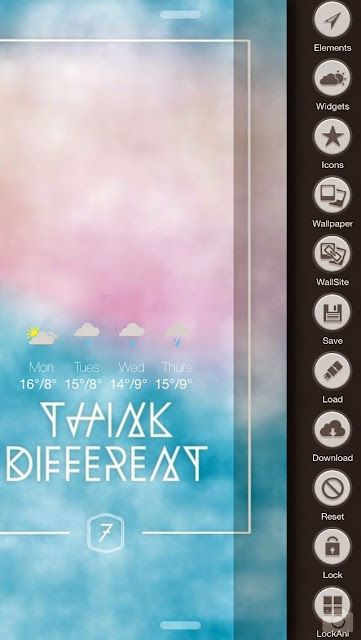
If you press elements it will give you a large collection of elements needed like, location, weather condition, forecast, feels like temp, actual temp, icons, date sunrise etc the list goes on. Plenty to tweak and adjust to get your lockscreen just how you want it.

Once you've selected the elements you'd like on your lockscreen, you can then change the colour, put shadows on the text and change the colour of the shadows. You can also scale each element individually or have them all the same size, you also have a wide selection of fonts to choose from.See below for screenshots of colouring elements and shadows and fonts.

This LockBuilder is very user friendly, within a couple of minutes using it you will be very comfortable using it. This LockBuilder even has the ability to make shapes if you click on create inside elements. This has a beautifully animated widget which is smooth, and very fun to watch clouds float across screen or seeing a sun just float up to the top of your screen. This is a fantastic LockBuilder and JunesiPhone has really changed the game, the possibilities for your lockscreen are now never ending, but to also have the smoothness and a brilliant UI to match is unbelievable. I've been very lucky to of been able to test this tweak, and I love it. I take my hat off to you June on a marvelous Cydget. 2 things you'll need to get this tweak making your lockscreen beautiful is Cydget free from Cydia and LockBuilder Evo which you can pick up from here click here  http://junesiphone.com/
Have fun with it, I know you will. This is Evoloution. 1 word to describe this tweak AWESOME.